Secrets
Two kinds of secrets exist, and it's important not to confuse them:
- Deploy/runtime secrets — GitHub Actions secrets + the VPS
deploy/.env. These are injected into containers at deploy time. Engineering reference:docs/secrets-setup.md. - LLM/STT/TTS/Twilio provider config — stored in the database
(
public.global_settings), edited by an admin in the UI at/admin/settings.
Deploy/runtime secrets
These are set once as GitHub Actions secrets and rendered into the stack at deploy time (plus SSH/VPS secrets for bootstrap). The set includes:
| Secret | Used for |
|---|---|
JWT_SECRET |
Signs the Pi Device JWT; also the seed for the derived per-user API_SERVER_KEY. |
PROVISIONER_INTERNAL_TOKEN |
Bearer for /v1/internal/* service-to-service calls. |
LIVEKIT_API_KEY / LIVEKIT_API_SECRET |
LiveKit tokens + webhook signing. |
SUPABASE_URL / SUPABASE_ANON_KEY / SUPABASE_SERVICE_ROLE_KEY / SUPABASE_DB_URL |
Auth + Postgres. |
TWILIO_* |
WhatsApp Business (where used outside the DB config). |
GRAFANA_ADMIN_PASSWORD |
Grafana login. |
SENTRY_DSN (optional) |
Crash capture; no-op if unset. |
docs/secrets-setup.md documents exactly where each value comes from (the Supabase,
Twilio, and GitHub setup steps).
Provider config lives in the database
LLM, STT, TTS, and Twilio provider settings are not GitHub secrets — they're rows in
public.global_settings, edited by an admin in the browser:
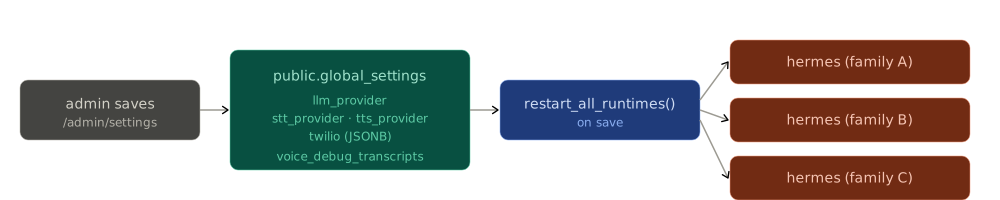
- LLM config is global and admin-only. There are no per-user keys. The provisioner
reads
global_settings.llm_providerand injects env vars atdocker runtime. - On save,
restart_all_runtimes()recreates every running container so the new key takes effect immediately, fleet-wide.
A bad LLM key takes down everything at once
Because the LLM key is global, an expired/over-quota key breaks voice, chat, and WhatsApp simultaneously. That's the first thing to check in an "all surfaces dead" incident — see Runbooks.
Never commit secrets
deploy/.env, prod/ scratch notes, and provider keys are not for git. The prod/
folder holds credential templates and VPS notes — treat it as local-only.