Onboarding & pairing
How a brand-new Raspberry Pi goes from "unboxed" to "talking to its family's agent." The
canonical engineering runbook is docs/pi-onboarding.md; this is the conceptual version.
Install
The Pi software installs with one command:
That sets up sudoedge (the native Python process) plus the systemd units that run and
auto-update it. Device config lives at /data/config/device.json.
The SoftAP pairing flow
A fresh Pi has no WiFi credentials and no screen, so it bootstraps over its own temporary WiFi access point (SoftAP) with a captive portal.
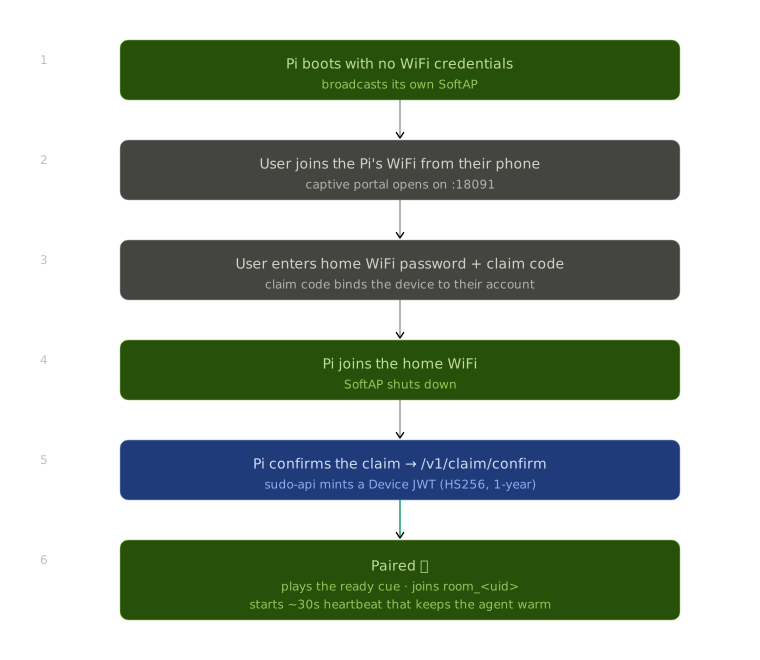
- The Pi broadcasts a SoftAP. The user joins it; a captive portal pops up on
:18091. - The user enters their home WiFi password and a claim code (which binds the device to their account).
- The Pi joins the home WiFi and confirms the claim at
/v1/claim/confirm, receiving a long-lived Device JWT. - From then on the Pi authenticates with that JWT, joins its LiveKit room, and starts the ~30s heartbeat that keeps the family's agent warm.
Audio cues stand in for a screen
The Pi has no display, so all feedback is sound. See Audio cues for what the tones mean. A key principle: the device never claims it's ready before the mic is actually live.
SoftAP is fiddly
The captive-portal layer (NetworkManager + dnsmasq + IP leases) has bitten us with IP
conflicts and binding issues. docs/pi-onboarding.md has the full pitfalls list, and
tools/softap-repro/ is a Docker harness that reproduces the networking layers
(minus the radio) for debugging without a physical Pi.
Auto-update
A separate systemd unit (sudo-update.timer → sudo-update.service) checks
sudohomes.com/manifest.json roughly hourly. On a new version it snapshots the current
good source+venv, re-runs install.sh, applies a 180s health gate, and auto-rolls-back if
the new version is unhealthy. Operators control rollout via manifest.json
(paused / rollout_pct / min_check_sec). Details in Deploy
and RELEASE.md.
Let devices update on their own cadence
After a tagged release, paired Pis pick up the update on their own cycle. Don't force an update on a live device unless you're asked to.