Database & migrations
All durable state lives in Supabase Postgres. There are no local SQLite volumes anymore (that was pre-pivot). This page covers the schema and the one thing that trips everyone up: migrations don't auto-apply.
Migrations are manual
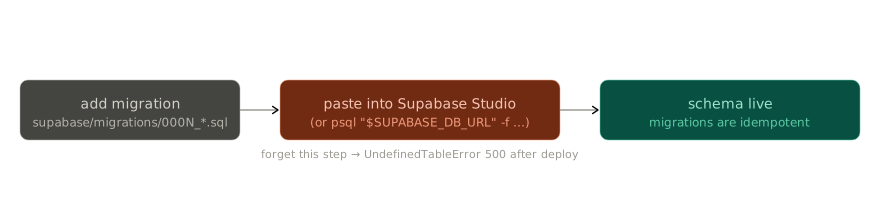
- Schema lives in
supabase/migrations/0001..*.sql. - Nothing auto-applies them. When you add one, you paste the SQL into Supabase
Studio's SQL Editor (or run
psql "$SUPABASE_DB_URL" -f <file>). - All migrations are idempotent (
CREATE TABLE IF NOT EXISTS,DROP TRIGGER IF EXISTS), so re-running is safe.
UndefinedTableError after a deploy = unapplied migration
The classic symptom of a forgotten migration is a 500 with UndefinedTableError
right after a deploy. Before debugging deeper, check whether a migration is sitting
unapplied.
Treat the SQL files as schema documentation
Because they're manual and idempotent, the migration files double as the authoritative description of the schema — read them to learn the tables.
Key tables to know
| Table | What it holds |
|---|---|
public.global_settings |
Admin-set provider config (llm_provider, stt_provider, tts_provider, twilio) and feature flags (e.g. voice_debug_transcripts). See Secrets. |
public.family_members |
Phone-number → family-account mapping. Powers WhatsApp routing. See WhatsApp. |
public.telemetry_events |
One row per pipeline stage-transition, keyed by turn_id. See Observability. |
public.user_settings |
Legacy — the table still exists but nothing reads from it. Don't add to it. |
Per-family agent state is NOT in Postgres
Worth stressing: the agent's memory, sessions, and skills live in each hermes
container's docker volume (hermes-user-<hex>-data:/opt/data), not in Supabase.
Supabase holds account/auth/telemetry/config; the agent's working state is on its volume.
That split matters when you reason about what survives what:
- Recreating a hermes container (e.g. admin config save) keeps the volume → memory survives.
- Deleting the volume wipes that family's memory/sessions.