Per-user provisioning
Each family gets its own hermes container. This page explains how that container is
born, configured, kept alive, and reaped. The logic lives inside sudo-api at
cloud/api/provisioner.py — there is no separate provisioner service.
Why per-user containers at all
The agent needs to be stateful: persistent memory, ongoing sessions, scheduled crons, and per-family skills. Giving each family its own container with its own data volume keeps all of that isolated and durable, and lets the agent be proactive (it has a long-lived home to run crons in). The cost is orchestration — which is exactly what the provisioner handles.
The lifecycle
1. Trigger
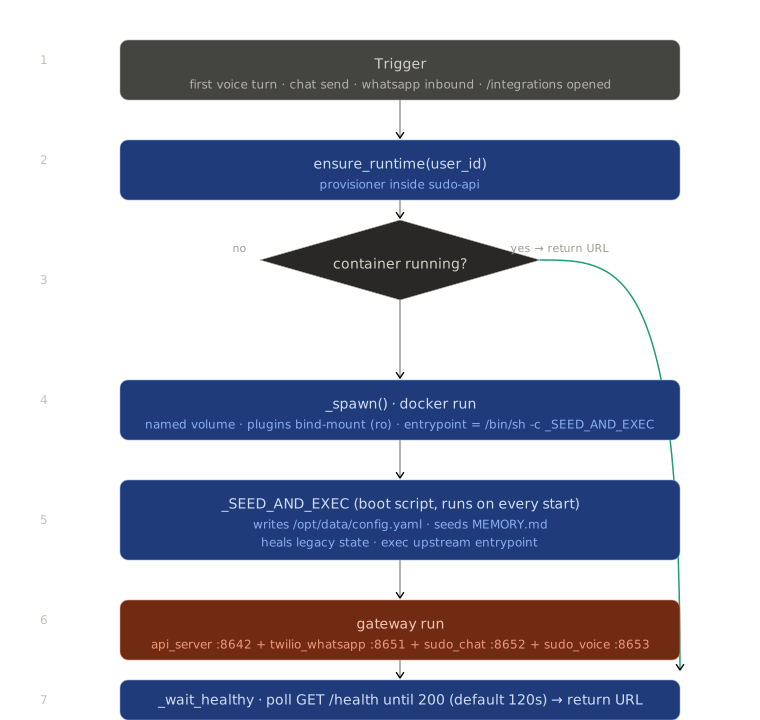
Anything that needs the agent calls ensure_runtime(user_id) first: a voice turn (from
voice-bridge), a chat send, a WhatsApp inbound, or even just opening /integrations.
2. Spawn
If the container isn't running, _spawn() issues a docker run with:
- A named volume
hermes-user-<uuid-hex>-datamounted at/opt/data— this is where sessions, memories, and skills survive restarts. - A read-only bind-mount of our plugins directory at
/opt/data/plugins. - An entrypoint override to
/bin/sh -c <_SEED_AND_EXEC>— our boot script.
Container naming
Containers are named hermes-user-<32-char uuid hex> (uuid.UUID(user_id).hex, no
dashes). Any hermes-user-usr_* containers on the VPS are orphans from an old deploy
and are safe to docker rm -f.
3. Seed config on every boot
_SEED_AND_EXEC is the heart of "we don't fork hermes." On every start it:
- Writes a Sudo-managed
/opt/data/config.yaml(overwriting user edits — we are intentionally opinionated). This enables ourplatforms:(api_server, twilio_whatsapp, sudo_chat, sudo_voice), the toolsets, and memory settings, with the LLM provider pulled fromglobal_settings.llm_provider. - Seeds
/opt/data/memories/MEMORY.mdwith the account identity block. - Heals root-owned
.envfiles from older builds; purges the legacy Baileys WhatsApp dir. - Exec's upstream's tini + entrypoint with
gateway run.
Don't override ENTRYPOINT in the Dockerfile
Upstream's entrypoint activates the venv that puts hermes on $PATH. We override
only at docker run time (--entrypoint /bin/sh) and then call upstream's
entrypoint from the wrapper. Overriding it in the image breaks the agent.
4. Wait for healthy
ensure_runtime() blocks on a GET /health poll (default 120s) so callers only get the
URL once the agent can actually serve.
Keeping it warm, and reaping it
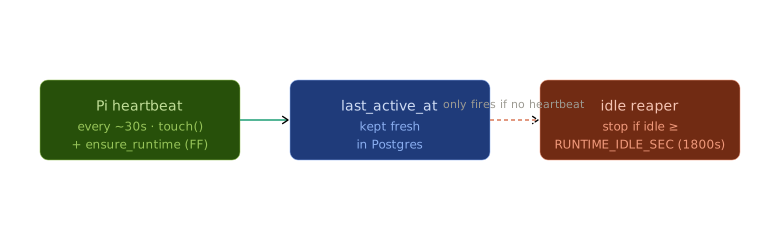
- A paired, powered Pi sends a heartbeat ~every 30s, which touches
last_active_atand fire-and-forget callsensure_runtime. So in practice the agent stays warm whenever the home device is on. - The idle reaper stops containers idle for
RUNTIME_IDLE_SEC(default 1800s). In practice this only bites when the box is off or unpaired.
Config changes are fleet-wide
When an admin saves new LLM credentials at /admin/settings, restart_all_runtimes()
does a docker rm -f + respawn + warm-up probe for every active container, so the new
key takes effect immediately across all families. LLM config is global and admin-only —
there is no per-user key. See Auth model and Secrets.
Where to look in the code
| Function | Role |
|---|---|
ensure_runtime() |
The entry point everything calls. Spawn-if-needed + wait-healthy. |
_spawn() |
The actual docker run with volume, plugins, entrypoint override. |
_SEED_AND_EXEC |
The boot script (a shell string) injected as the entrypoint. |
api_key_for() |
Derives the per-user API_SERVER_KEY (HMAC, no storage). |
evict_idle() |
The idle reaper. |
restart_all_runtimes() |
Fleet-wide recreate on admin config save. |
All in cloud/api/provisioner.py.