Audio devices
Picking the right microphone and speaker on a Raspberry Pi is harder than it sounds —
there's no "default device" you can trust. This is the high-level version of
docs/pi-audio.md.
The problem
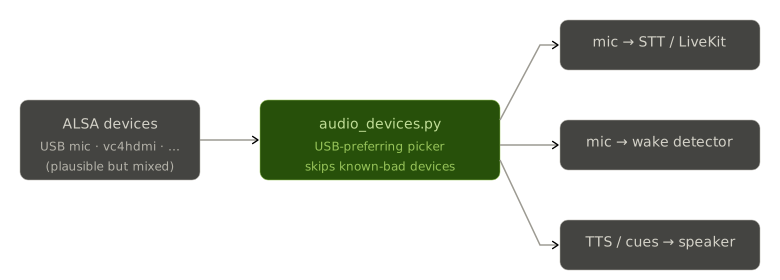
PortAudio enumerates raw ALSA devices, and a Pi has several that look plausible but aren't usable:
vc4hdmishows up but has no capture (HDMI audio out only).- Onboard outputs and various virtual devices clutter the list.
- The real mic/speaker is usually a USB device that may appear at a different index on every boot.
How we pick
sudoedge/audio_devices.py runs a USB-preferring picker: it walks the enumerated
devices and selects the USB capture/playback device, skipping the known-bad ones. Three
consumers depend on this choice:
Known hardware shapes
Different Pis in the fleet have different audio hardware, and the quirks matter:
- A combo USB mic/speaker that is 48 kHz-only — sample rates must be handled, the right device picked, the mic released cleanly, and the LiveKit room torn down on exit.
- A reSpeaker XVF3800 mic array that ships in the wrong mode and must be flashed once before it even appears as a USB audio device — see reSpeaker flashing.
If voice 'does nothing' on a Pi, suspect audio first
Before blaming the cloud, check device enumeration on the Pi. A wrong device pick or a
mic that never opened looks identical to "the assistant is broken" from the user's
side. docs/pi-audio.md has the debugging steps.